What are you currently working on?

A place for Ogre users to discuss non-Ogre subjects with friends from the community.
User avatar
nullsquared
Old One
Posts: 3245
Joined: Tue Apr 24, 2007 8:23 pm
Location: NY, NY, USA
x 11

What are you currently working on?

Post by nullsquared »

OK - this is a thread to post whatever you're currently working on. Comments and discussions are fine, however, keep in mind the general topic of the thread ;) Basically, this is a thread to post whatever you're most recently proud of, without the need of </shameless_plug> tags :mrgreen:

I'll go first. I've been working on an FP16 HDR lighting pipeline in the past 3 days:

Image

Image

It features luminance adaptation, blooming, and so on, but it's the first time I've implemented HDR lighting so there's bound to be something incorrect in there.
User avatar
mkultra333
Gold Sponsor
Gold Sponsor
Posts: 1894
Joined: Sun Mar 08, 2009 5:25 am
x 116

Re: What are you currently working on?

Post by mkultra333 »

That looks great.

I'm fumbling around trying to work how I'm going to add decent looking transparency to my quasi-deferred shading system.
"In theory there is no difference between practice and theory. In practice, there is." - Psychology Textbook.
User avatar
nullsquared
Old One
Posts: 3245
Joined: Tue Apr 24, 2007 8:23 pm
Location: NY, NY, USA
x 11

Re: What are you currently working on?

Post by nullsquared »

mkultra333 wrote: I'm fumbling around trying to work how I'm going to add decent looking transparency to my quasi-deferred shading system.
It's really easiest to just render transparent objects forward-style after everything that's deferred (either using viewport-masking or render queues).
User avatar
PolyVox
OGRE Contributor
OGRE Contributor
Posts: 1316
Joined: Tue Nov 21, 2006 11:28 am
Location: Groningen, The Netherlands
x 18
Contact:

Re: What are you currently working on?

Post by PolyVox »

Fully destructible environments, as always! Currently working a destructible earth, ready for some asteroid impacts. The surface data is from NASA's Blue Marble project, while the core uses Perlin noise to blend between rock and magma. It's extremely work-in-progress...

Image

nullsquared wrote:I've been working on an FP16 HDR lighting pipeline in the past 3 days
HDR is also on my todo list - I want the magma to glow :-)
User avatar
mkultra333
Gold Sponsor
Gold Sponsor
Posts: 1894
Joined: Sun Mar 08, 2009 5:25 am
x 116

Re: What are you currently working on?

Post by mkultra333 »

Fully destructible environments are pretty cool. Playing Doom 3 with stereoscopic goggles a few years ago, I found myself wondering, "What more could I want?" And the answer was "Well, it'd be neat if my rocket laucher could actually destroy this stuff, instead of exploding harmlessly off a desktop lamp."

It's starting to turn up a lot now, I think it's the next "must have" gadget in any shooter. My own project won't have it, but maybe later...

Edit: Destroying the entire Earth is taking the idea to extremes... cool!
"In theory there is no difference between practice and theory. In practice, there is." - Psychology Textbook.
User avatar
nullsquared
Old One
Posts: 3245
Joined: Tue Apr 24, 2007 8:23 pm
Location: NY, NY, USA
x 11

Re: What are you currently working on?

Post by nullsquared »

Destructible earth :shock:

If all you want is glow, just use bloom without HDR. Or if you don't want to do a bright pass, just render the magma itself to a separate buffer, blur it, and add it to the main scene - instant glow :D
User avatar
betajaen
OGRE Moderator
OGRE Moderator
Posts: 3447
Joined: Mon Jul 18, 2005 4:15 pm
Location: Wales, UK
x 58
Contact:

Re: What are you currently working on?

Post by betajaen »

Mostly PhysX related things;

Inertia
"Inertia" is another PhysX/Ogre wrapper I have in mind but simulates inertial frames to allow the effects of general relativity. It's still really early and just in the framework stage, but it depends heavily on boost.

It has a fantastic unit system that the compiler will complain if you put a force into a momentum function, and even will correctly return the correct unit if you perform basic physics equations; i.e.

Code: Select all

M::force F = M::mass(10) * M::acceleration(5,0,0);
I'm going to base a game around this framework; but it will only focus on the core mechanics of physics - no cloth or fluids. So it won't replace NxOgre - more of an very specific alternate.

Salt

"Salt" is my attempt at a proper serialisation framework and document for PhysX. It allows partial or a full scene to be serialised to a file, as well as working with exporters/importers for any 3D modeller or editor.

It is more of a design document than actual piece of code. Although I am working on a C++ implementation of the framework alongside of it. Ideally, my exporter could be written in Python - it obeying all the rules and behaviour of written down classes and functions, it will write to a file, that my C++ reader implementation expect it to be like.


In my precious spare time, I like to alternate between the two. Today, I've been working on salt. :D
User avatar
mkultra333
Gold Sponsor
Gold Sponsor
Posts: 1894
Joined: Sun Mar 08, 2009 5:25 am
x 116

Re: What are you currently working on?

Post by mkultra333 »

Man, I'd love to play around in a special relativity sandbox. Especially if you could alter the speed of light, so see its effects at low speeds. That sounds pretty complex. Are we talking Minkowski geometries in a rendered 3d environment? Yikes!
"In theory there is no difference between practice and theory. In practice, there is." - Psychology Textbook.
User avatar
betajaen
OGRE Moderator
OGRE Moderator
Posts: 3447
Joined: Mon Jul 18, 2005 4:15 pm
Location: Wales, UK
x 58
Contact:

Re: What are you currently working on?

Post by betajaen »

There are three problem I can think of though.

1. Calculating the Lorentz factor γ will have inaccuracies with a single or double precision system.

2. I can only have one observer; the camera/player/etc - which observe the effects of time dilation and length contraction. Although adding more observers will be fairly easy to implement, in reality impossible to do so. Both observers share the same inertial frame (the earth) and would observe the simulated results incorrectly. i.e. if Observer B is travelling at 0.9C; Both in the application and outside the application the time dilation should be the same, which in the case is it not. So no multiplayer. ;)

3. Implementing separate inertial frames will require the use of NxScenes. Each NxScene can simulate at different time updates allowing faster or slow-motion effects; offset that with a scenenode and a scaling function. I can implement a very crude version of GR. Problem is PhysX only supports 32 scenes, so I can only have 32 inertial frames thus can only have up to 32 objects in motion in the universe at a time. The alternate is for objects who have a range of Lorentz factors to share the same inertial frame, and those of which the effects of GE are unnoticeable under slower speeds (< 0.2 C) to all be in the same one where GE does not exist.

Other than that - It should be a fun little framework. :D
User avatar
betajaen
OGRE Moderator
OGRE Moderator
Posts: 3447
Joined: Mon Jul 18, 2005 4:15 pm
Location: Wales, UK
x 58
Contact:

Re: What are you currently working on?

Post by betajaen »

Well the Lorentz transforms are in, and it seems to work pretty well with the template unit system;

Code: Select all

#include <inertia/inertia.h>
#include <iostream>

namespace M = inertia::mechanics;
namespace R = inertia::relativity;

void main()
{
 // Normal Newton Force calculation using a normal Galilean spacetime
 M::force F = M::mass(10) * M::acceleration(5,0,0);

 // Calculate lorentz factor of a object travelling at 0.75c
 R::lorentz_factor y = R::lorentz_factor_of(M::constants::c() * 0.75);

 // Calculate Lorentz time transformation.
 M::time t1 = M::time(10.0) * y;
 
 // Calculate Lorentz length contraction.
 M::length l1 = M::length(10.0, 0.0, 0.0) / y;
 
 // And out it goes.
 std::cout << F.x << std::endl << t1 << std::endl << l1.x << std::endl;
}

Code: Select all

50
15.1186
6.61438
For those who are uneducated in the ways of General Realtivity. Basically the above means; the faster you go towards c (speed of light); you appear to contract in length by an observer (get thinner in direction of travel) and appear to be in slow-motion. 10 seconds have appeared to passed by the moving object, compared to the 15 seconds to person watching it. 6 metres long to the person watching it and 10 metres long to the moving object.
User avatar
nikki
Old One
Posts: 2730
Joined: Sat Sep 17, 2005 10:08 am
Location: San Francisco
x 13
Contact:

Re: What are you currently working on?

Post by nikki »

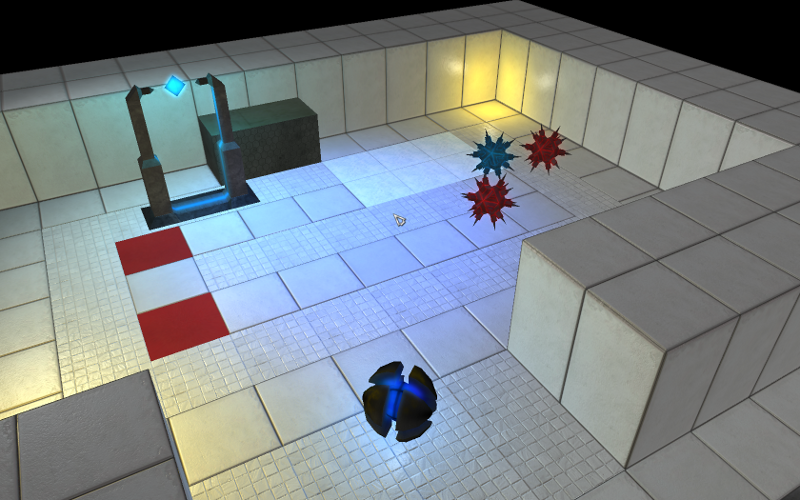
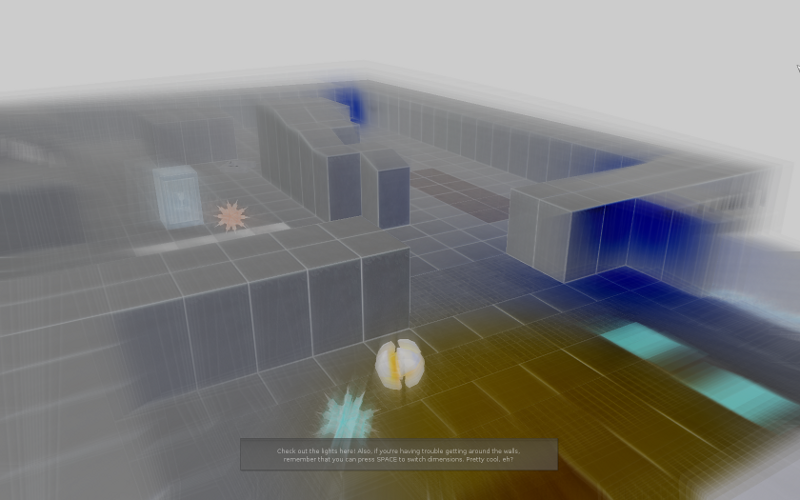
Working on GraLL 2, sequel to my previous game, got a lot of new stuff ('dimensions', Python scripting (can attach Python scripts to almost any event, and almost everything's bound to Python), new obstacles, proper save/load anywhere in the middle of the game, and other stuff), eye candy (cool lighting, glow), etc.

Image

Image

Image

Videos.

Right now I'm wondering whether I should use convex 'brushes' for the static level geometry, or concave-allowed 'trimeshes'. The former makes 'dimension checking' (if the Player tries to switch dimensions when there's something in his position in the other dimension, it stops him) easier, while for the latter I'll have to do something like shoot a ray out and do an even-odd point-in-trimesh check (Bullet doesn't think of trimeshes as 'volumes', just as a bunch of triangles, which is the problem (if you're not 'intersecting' with a wall, but are just 'in' the wall, it won't tell me)).

(also I'm on vacation on a non-powerful laptop, so no more eye-candy work :P )
jjp
Silver Sponsor
Silver Sponsor
Posts: 597
Joined: Sun Jan 07, 2007 11:55 pm
Location: Cologne, Germany
Contact:

Re: What are you currently working on?

Post by jjp »

The lighting really does a lot for the visual quality of your game. This looks way better than GraLL :)
Enough is never enough.
User avatar
nikki
Old One
Posts: 2730
Joined: Sat Sep 17, 2005 10:08 am
Location: San Francisco
x 13
Contact:

Re: What are you currently working on?

Post by nikki »

jjp wrote:The lighting really does a lot for the visual quality of your game. This looks way better than GraLL :)
Thanks. :) Once I'm back from vacation I'm going to try and get some cool shadows. Hopefully that'll make it look even better. :D
User avatar
Klaim
Old One
Posts: 2565
Joined: Sun Sep 11, 2005 1:04 am
Location: Paris, France
x 56
Contact:

Re: What are you currently working on?

Post by Klaim »

Today I take a break from my game project to work on administration stuffs and webcomics. But most of the time (I'm unemployed currently) I work on my game. I'm currently working on non-yet-visible core mecanics so I don't have much to show on that side, but last weeks I worked on fusionning different libs to get scripting in flying consoles : http://vimeo.com/5654166?hd=1
Details are there : http://www.klaimsden.net/blog/2009/firs ... s-scripts/

Nothing really eye candy for now I guess :)
User avatar
aerique
Halfling
Posts: 59
Joined: Thu Oct 18, 2007 2:37 pm
Location: The Netherlands
Contact:

Re: What are you currently working on?

Post by aerique »

Playing with my Common Lisp to Ogre bindings: Okra. Implemented the marching cubes algorithm in it a few weeks ago but ran out of free time:
Image
(the low FPS is because it running on a old computer without proper 3D acceleration)

I hope to continue working on some private projects using Okra in the near future.

My interest is basically the same as PolyVox's: fully destructible environments.
User avatar
PolyVox
OGRE Contributor
OGRE Contributor
Posts: 1316
Joined: Tue Nov 21, 2006 11:28 am
Location: Groningen, The Netherlands
x 18
Contact:

Re: What are you currently working on?

Post by PolyVox »

aerique wrote:My interest is basically the same as PolyVox's: fully destructible environments.
Interesting! Looks like I have competition :-)
User avatar
nullsquared
Old One
Posts: 3245
Joined: Tue Apr 24, 2007 8:23 pm
Location: NY, NY, USA
x 11

Re: What are you currently working on?

Post by nullsquared »

Starting to work on a Lua-based object properties window (to replace the hardcoded C++ one):

Code: Select all

pickedEnt = nil

function updatePropertiesWinGenericProp(win)
    local lay = win:getLayout()

    win:update({
        test = { type = "text", text = "lol it's a gp" }})
    lay:addWidget(win:child("test"))
end

updatePropertiesWinFuncs = {}
updatePropertiesWinFuncs[game.genericProp.TYPE] = updatePropertiesWinGenericProp

stringTypes = {}
stringTypes[game.genericProp.TYPE] = "genericProp"

function updatePropertiesWin(ent)
    pickedEnt = ent

    local win = editor.guiSheet:child("propertiesWin")
    win:resetLayout()
    win:clearChildren(false)

    local lay = gui.verticalLayout()
    win:setLayout(lay)

    win:update({
        nameLabel = {
            type = "text",
            text = "name"
        },
        nameText = {
            type = "textBox",
            text = ent:name()
        },
        typeLabel = {
            type = "text",
            text = "type"
        },
        typeText = {
            type = "text",
            text = stringTypes[ent:type()]
        }
    })

    lay:addWidget(win:child("nameLabel"))
    lay:addWidget(win:child("nameText"))
    lay:addWidget(win:child("typeLabel"))
    lay:addWidget(win:child("typeText"))

    updatePropertiesWinFuncs[ent:type()](win)
end
Image
User avatar
Kojack
OGRE Moderator
OGRE Moderator
Posts: 7157
Joined: Sun Jan 25, 2004 7:35 am
Location: Brisbane, Australia
x 538

Re: What are you currently working on?

Post by Kojack »

Right at this moment (10:41pm)...
What I should be working on: marking and getting tomorrow's class prepared.
What I am working on: 3dsmax material exporter

I want a simple way to generate shader based ogre materials from standard max materials, without having to go through the process of setting up ogremax materials and manually configuring shaders within it.
So I've been working on a maxscript tool today which iterates all materials in the max scene and generates an ogre material file. Each material generated will be configured to use suitable cg shaders based on what settings are in the material. Right now it can successfully generate a material with a diffuse map, normal map and per pixel lighting, using a slightly modified version of the ogre multilight cg shader.
I'm going to add more map types (specular, cone, etc) and support baking of max procedural textures into images.
It's mainly for my students, but I'll stick it on here somewhere when it's more feature complete.

Next trimester (starts in 4.5 weeks) will be a much lighter workload for me, so hopefully I'll be able to get back to all the unfinished things: vertex cache optimisation, more cuda stuff, posting more on here, etc.
Hmm, I've got an urge to try my streetlight method on some GTA San Andreas maps...
User avatar
nullsquared
Old One
Posts: 3245
Joined: Tue Apr 24, 2007 8:23 pm
Location: NY, NY, USA
x 11

Re: What are you currently working on?

Post by nullsquared »

Kojack wrote:Right now it can successfully generate a material with a diffuse map, normal map and per pixel lighting, using a slightly modified version of the ogre multilight cg shader.
I'm going to add more map types (specular, cone, etc) and support baking of max procedural textures into images.
I just recently did a shader for a fellow Ogre-er and I put it in the public domain, perhaps you might find it useful: http://www.ogre3d.org/wiki/index.php/No ... ing_Shader

It handles diffuse mapping, normal mapping, specular mapping, and baked AO mapping (and per-pixel lighting, 1 light per pass as it is right now). It also handles the fixed-function surface material properties for diffuse and specular values (including the "shininess" value for specular), and supports (according to my testing, as least) all 3 light types. The code is relatively easy to read (IMO) and should be easily extendable to multiple lights per pass due to the naming of the light variables. Not particularly the most efficient thing around, but I was going for accuracy and features over speed here.

Anyways, just thought I'd mention it.
User avatar
Kojack
OGRE Moderator
OGRE Moderator
Posts: 7157
Joined: Sun Jan 25, 2004 7:35 am
Location: Brisbane, Australia
x 538

Re: What are you currently working on?

Post by Kojack »

Groovy, I'll stick it in. The ogre one (Examples/BumpMapping/MultiLightSpecular) seems to have some flaws (or I'm using it badly).

I would have made my own, I was just too lazy. Writing maxscript is hard enough without playing with rendermonkey too. :)
User avatar
nullsquared
Old One
Posts: 3245
Joined: Tue Apr 24, 2007 8:23 pm
Location: NY, NY, USA
x 11

Re: What are you currently working on?

Post by nullsquared »

Scripted triggers :mrgreen:

Image

Image

Image

Code: Select all

function testOnEnter(trigger, ent)
    trigger:setMaterial("red")
end

function testOnExit(trigger, ent)
    trigger:setMaterial("green")
end
User avatar
Kojack
OGRE Moderator
OGRE Moderator
Posts: 7157
Joined: Sun Jan 25, 2004 7:35 am
Location: Brisbane, Australia
x 538

Re: What are you currently working on?

Post by Kojack »

Your shader works great, it will be the default one now.
Although I spent a while debugging the cg, and my meshes, to work out why lighting was backwards on some meshes.
Finally I discovered that the flat normal map texture stored on the wiki is a png, but the material file wanted a bmp. :)
User avatar
nullsquared
Old One
Posts: 3245
Joined: Tue Apr 24, 2007 8:23 pm
Location: NY, NY, USA
x 11

Re: What are you currently working on?

Post by nullsquared »

Kojack wrote:Your shader works great, it will be the default one now.
:D
Finally I discovered that the flat normal map texture stored on the wiki is a png, but the material file wanted a bmp. :)
Woops :oops: I'll fix it on the wiki (unless you already did). Should've checked your Ogre.log :mrgreen:
Edit:
Fixed the wiki.
User avatar
Kojack
OGRE Moderator
OGRE Moderator
Posts: 7157
Joined: Sun Jan 25, 2004 7:35 am
Location: Brisbane, Australia
x 538

Re: What are you currently working on?

Post by Kojack »

Here's a sample:
Image
The left creature (Bug Back Toad by Son Kim) is BaseWhite material, the middle is fixed function vertex lighting with the toad's diffuse texture, the right is Null's shader with the toad's diffuse, specular and normal maps.
Good normal and specular maps really make a huge difference to a model.

(Floor is csm)


I got the model from http://ompf.org/forum/viewtopic.php?f=7&p=14905
User avatar
nullsquared
Old One
Posts: 3245
Joined: Tue Apr 24, 2007 8:23 pm
Location: NY, NY, USA
x 11

Re: What are you currently working on?

Post by nullsquared »

Ha looks cool, indeed good maps make a big difference :mrgreen: Very Doom3-y
Post Reply