Page 1 of 1
Help material! Transparent material :(... weird render
Posted: Thu Aug 11, 2005 9:38 pm
by maxxoros
I want to made a forest with many transparent map for crossing plane
=======
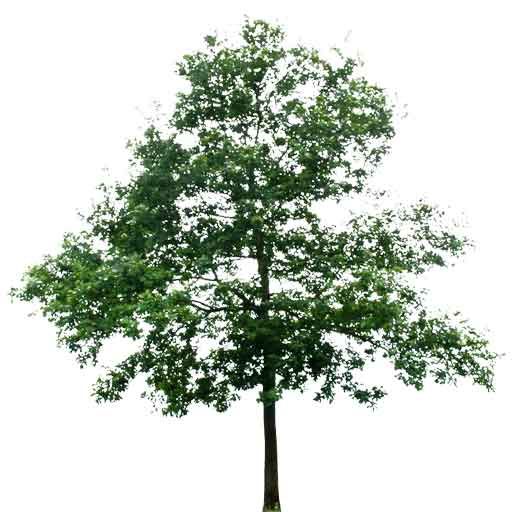
This is the material I use, it is a png file and transparent
-------------
This is the script I use...
material lambert4
Code: Select all
{
	technique
	{
		pass
		{
			lighting on
			ambient 1 1 1 1
			diffuse 1 1 1 1
			specular 0 0 0 0
			emissive 0 0 0

			scene_blend alpha_blend
			depth_write off

			texture_unit
			{
				texture acacc.png
				tex_coord_set 0
				colour_op modulate
			}
		}
	}
}
Everything go right with one tree
But if it is a forest...weird thing that front trees is "blend" with tree behind them..so we do not only see the tree at the front...but also see tree that must be hide but in some case, the fronts tree is transparent a little and we can see throgh them
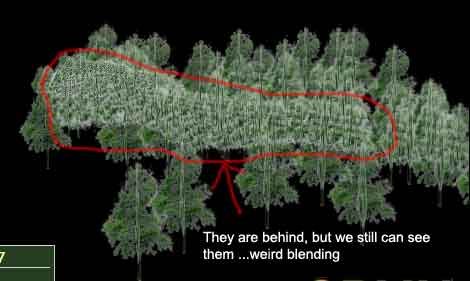
-----------------
But at other camera view...the problem disappear
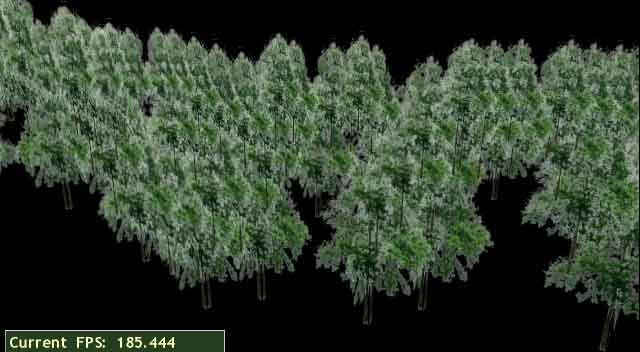
I have change type of image data into TGA with alfa channel (not like transparent data area in .PNG)...and this can not solved...
The problem leave in
Code: Select all
			scene_blend alpha_blend
			depth_write off
---------------
Could anyone tell me how to solve this problem...the right kind of transparent script

Posted: Fri Aug 12, 2005 4:56 am
by maxxoros
No one could help me...I think this is a simple thing
Posted: Fri Aug 12, 2005 5:06 am
by Dekuie
I've seen similar things when doign realtime rendering with transparency but i could also never figure out how it worked, but it was with another rendering engine. just wait i'm sure somone will understand what is going on.
ps: i noticed that with the other engine that when every transparent object (especialy ones useign the same materal) that when the angle is rotated even slightly in a different direction then all the others, the problem lessens if not disapears. but don't rely too much on this idea, it most likely wont work.
if anything the problem "could" be that the engine confuses the trees for beign the same because not only is it the same texture and material, it looks as if the trees are all angled the same way. just a thought.
Posted: Fri Aug 12, 2005 5:23 am
by Olex
I think I saw a solution on forums somewhere, just search for transparent material, alpha blending, etc. One of those should given you a result. I recall that post has a sample of .material file and what must be done.
Good luck.
Posted: Fri Aug 12, 2005 5:56 am
by genva
Replace
with
in you material script.
[edit]You can modify
128 with value in ragne [1,255] to find the best appearance.[/edit]
Posted: Fri Aug 12, 2005 6:15 am
by maxxoros
Thanks a lot
---
I will make this report to bisco so he can fix this the next version of maya plugin

, anyway, I have give this info to WIKI material tutorial so this problem could be advoid later
Posted: Fri Aug 12, 2005 10:21 am
by Crashy
Another thing to know: the non visible part of your texture, don't let it white, give it a near color of your visible part. Here, a green color.
Posted: Fri Aug 12, 2005 5:04 pm
by BlasterN
The problem is in the texture.
use: alpha_rejection greater x // [0..255]
this use the transparent color, in this case white and all colours near white (greater x far colours are transparent too) and make them transparent. You have to play with this value.
btw: I'm not sure if this is the use of alpha_rejection I use it because this is the effect I see in ogre.
When you take a texture of forest like Crashy says make the transplarent colour near the colour of what you want to see (green).
edited: From the API
alpha_rejection
Sets the way the pass will have use alpha to totally reject pixels from the pipeline.
Format: alpha_rejection <function> <value>
Example: alpha_rejection greater_equal 128
The function parameter can be any of the options listed in the material depth_function attribute. The value parameter can theoretically be any value between 0 and 255, but is best limited to 0 or 128 for hardware compatibility.
Default: alpha_rejection always_pass
Posted: Mon Aug 15, 2005 5:38 pm
by metaldev
the problem is caused by using blend alpha... as far as i know, a 3d engine for whatever reason needs to draw objects with blend_alpha in different orders than regular objects to blend them properly. because it would be extremely expensive to have per-polygon depth checking, many times you get sorting issues like that... the engine doesnt check what to draw first and last.
using alpha rejection of course fixes this because you are no longer using the blend alpha algorithm (alpha rejection is also a faster method... but you get no blend)
if one is intent on using blend alpha, the other thing to try is depth bias.
Posted: Mon Aug 22, 2005 12:15 pm
by bisco
mmm, I had the same problems with transparency.
I believe the problem could be linked to bad bounding boxes too, right now
if you export in world coordinates you get very big bboxes, the solution is to export the transform nodes and the objects in transform relative coordinates.
I'll try a few tests to try to solve the problem
Posted: Mon Aug 22, 2005 7:45 pm
by maxxoros
great 2 see ya..bisco
--
when we could test your latest plugin...
:....I m really eager now
Posted: Mon Aug 22, 2005 9:40 pm
by bisco
I've revisited the whole data structure of the plug-in and added support for multiple materials per mesh.
Just need to do a few tests and correct a few inevitable bugs and I'll post it

Posted: Tue Aug 23, 2005 7:48 am
by maxxoros
Multiple material per mesh is great..It will help us refine the plugin
--
@bisco: Do you think we should detach plugin into 2 part
#1 part: export XML, skeleton, convert .... solved by plugin
#2 part: material export by mel script..
---
Because there are ton of material script type and in future...shader will be used much in Dagon..so a open type for maya user to add mel define material export is neccessary ? So we could toghether develop the plugin base on the core structure of export mesh.