Page 1 of 1
Shadow artifacts with point light
Posted: Thu Jul 04, 2024 11:55 pm
by jwwalker
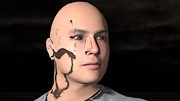
I noticed that point lights sometimes give me weird shadow artifacts, like so:
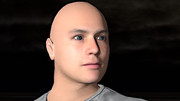
When I put a spot light at the same location with the same brightness, I get a more expected result:
I am a few months behind the tip of the master branch, so if there are no immediate ideas of what I'm doing wrong, I'll start by updating.
Re: Shadow artifacts with point light
Posted: Fri Jul 05, 2024 2:22 am
by dark_sylinc
Point lights are tricky when placed at more extreme cases.
In this particular case I suspect the shadow camera is "inside" of the head once the near plane is accounted for.
Try setting a low value for nearClip, explicitly with:
Code: Select all
pointLight->setShadowNearClipDistance( nearClip );
pointLight->setShadowFarClipDistance( farClip );
But please note that low near clips have a tendency to run into precision artifacts, exponentially (i.e. a small decrease in near plane results in a high increase of the chance of artifact like shadow acne).
Re: Shadow artifacts with point light
Posted: Fri Jul 05, 2024 7:05 pm
by jwwalker
That's an interesting idea (honestly I wasn't even aware of the existence of shadow clipping distances). However, the actor is about 1.0 units from the light, and when I called pointLight->setShadowNearClipDistance( 0.1 ), I saw no difference.
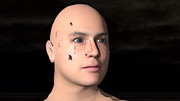
When I remove the actor's clothing (none of which is between the light and his face), much of the artifact goes away:
Re: Shadow artifacts with point light
Posted: Fri Jul 05, 2024 7:19 pm
by dark_sylinc
I'm afraid then the only sure way is to inspect it in RenderDoc and see what is going on.
A shadow maps is simply rendering from the light's perspective; to see what "the light sees" and anything behind it (from the light's perspective) must be in shadow, and anything in front of what the light sees must be lit.
Point lights are special because:
-
We need 6 passes (cubemap) due to its 360° nature. Perhaps something went wrong there.
-
If the compositor shadow node is incorrectly setup then it definitely could be this issue.
-
The "depth" is calculated as (pixel.pos - light.pos) / light.max_distance; unlike all other shadow maps that simply use the depth from the depth buffer as is. I can't imagine how this could be the problem, but it is another thing that's different from the rest of the light types.
-
The cubemap is converted into two sections of 2D using paraboloid mapping projection. I'm trying to resist this idea but perhaps paraboloid mapping projection is distorting the render too much; causing artifacts.
Re: Shadow artifacts with point light
Posted: Sat Jul 06, 2024 12:10 am
by jwwalker
I mostly develop on Mac, so I might be better off trying to figure out the native Metal debugging features rather than trying RenderDoc.
The shadow node is set up using ShadowNodeHelper::createShadowNodeWithSettings. The shadowParams vector looks like this:
Code: Select all
{
supportedLightTypes = 1u << LT_DIRECTIONAL,
technique = SHADOWMAP_PSSM,
numPssmSplits = 3,
atlasId = 0,
atlasStart = [ {0, 0}, {0, 2048}, {1024, 2048} ],
resolution = [ {2048, 2048}, {1024, 1024}, {1024, 1024} ]
},
{
supportedLightTypes = 1u << LT_POINT) | (1u << LT_SPOTLIGHT),
technique = SHADOWMAP_FOCUSED,
numPssmSplits = 0,
atlasId = 0,
atlasStart = {0, 3072},
resolution = {2048, 2048}
}
I'm passing false for useEsm, 4096 for pointLightCubemapResolution.
Re: Shadow artifacts with point light
Posted: Sat Jul 06, 2024 12:23 am
by dark_sylinc
The shadow node is set up using ShadowNodeHelper::createShadowNodeWithSettings. The shadowParams vector looks like this
Oh that's a relief (or perhaps not, it'd be easier if you just had a silly mistake in your setup  ). The settings look alright.
I mostly develop on Mac, so I might be better off trying to figure out the native Metal debugging features rather than trying RenderDoc.
XCode is great for shader debugging, but figuring out the ping pong between textures may be harder to visualize in XCode. Everyone has their own taste.
Re: Shadow artifacts with point light
Posted: Thu Jul 25, 2024 5:43 pm
by jwwalker
I've filed a bug report on this: https://github.com/OGRECave/ogre-next/issues/454
Now I know that it has to do with transparency as well as a point light.
Re: Shadow artifacts with point light
Posted: Fri Jul 26, 2024 12:03 am
by jwwalker
One other thing: If I use the F5 key in the sample to use ESM instead of PCF, then I see no shadows instead of bad shadows.
Re: Shadow artifacts with point light
Posted: Sat Jul 27, 2024 12:22 am
by jwwalker
Reproduced on Windows with Vulkan and Direct3D render systems.
Re: Shadow artifacts with point light
Posted: Sat Jul 27, 2024 7:47 pm
by jwwalker
This has been fixed by a recent commit: https://github.com/OGRECave/ogre-next/c ... 3dcecd4f45
I also just noticed a related subtlety: Hlms::createDatablock takes a single blend block as a parameter, and will use that for both the regular and caster blend block. But if you've set up the regular one for transparency, you probably don't want to use the same blend block for the caster. So in the transparent case, I need to follow up the block creation with something like:
Code: Select all
datablock->setBlendblock( Ogre::HlmsBlendblock(), true );