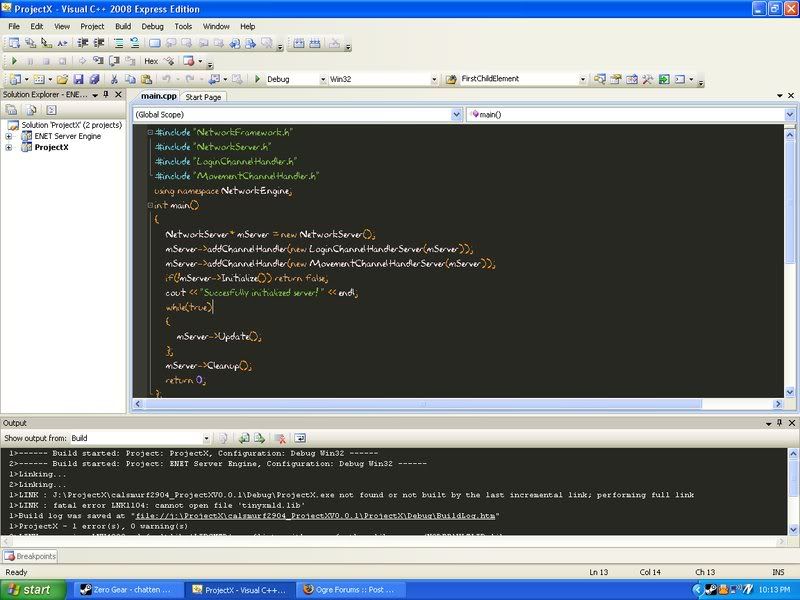
Your IDE enviroment settings/style?

A place for Ogre users to discuss non-Ogre subjects with friends from the community.
User avatar
^DJ_Link^
Kobold
Posts: 28
Joined: Tue Oct 18, 2005 5:04 pm
Contact:

Post by ^DJ_Link^ »

Thanks :D Using it right now
User avatar
JohnJ
OGRE Expert User
OGRE Expert User
Posts: 975
Joined: Thu Aug 04, 2005 4:14 am
Location: Santa Clara, California
x 4

Post by JohnJ »

Nice :). I've been using the default black-on-white type scheme for a long time, and I think betajaen's scheme might be a nice change for a while.

Here's my "variation" of it (to make use of Visual Assist's extra syntax highlighting capabilities):
Image

Kind of reminds me of my old DOS 80x25 editing days :)
User avatar
betajaen
OGRE Moderator
OGRE Moderator
Posts: 3447
Joined: Mon Jul 18, 2005 4:15 pm
Location: Wales, UK
x 58
Contact:

Post by betajaen »

Nice!

I wish I had Visual Assist, I would buy it if it worked with Visual Studio Express.

Here is "Monkai", it's the TextMate theme I based my scheme on. Since Visual Studio doesn't hilight or treats some things as the same, it doesn't look as good. But I'm sure Visual Assist with it's amazing syntax colouring facility will be able to make a good job at it.
User avatar
JohnJ
OGRE Expert User
OGRE Expert User
Posts: 975
Joined: Thu Aug 04, 2005 4:14 am
Location: Santa Clara, California
x 4

Post by JohnJ »

Interesting. Actually even with Visual Assist I couldn't completely duplicate that scheme because all VA does with syntax highlighting is basically add support for highlighting defines/enums, classes/structs/typedefs, and functions. Everything else is handled the same way.

But I'll probably play around with the colors a little to see if I can come up with something interesting anyway :)
User avatar
nullsquared
Old One
Posts: 3245
Joined: Tue Apr 24, 2007 8:23 pm
Location: NY, NY, USA
x 11

Post by nullsquared »

Blue/purple on black/gray kills my eyes, not sure how you guys actually enjoy it :|
User avatar
betajaen
OGRE Moderator
OGRE Moderator
Posts: 3447
Joined: Mon Jul 18, 2005 4:15 pm
Location: Wales, UK
x 58
Contact:

Post by betajaen »

Dude, what is up with your constipated Pickachu/Human hybrid avatar?
User avatar
calsmurf2904
Orc
Posts: 401
Joined: Tue Sep 16, 2008 9:39 pm
Location: Netherlands

Post by calsmurf2904 »

xD :
Image
Visit my blog at http://calsmurf2904.wordpress.com !
Got a Google Wave account? Add me as contact! (projectxgame <at> gmail <dot> com)
Image
User avatar
jacmoe
OGRE Retired Moderator
Posts: 20570
Joined: Thu Jan 22, 2004 10:13 am
Location: Denmark
x 179
Contact:

Post by jacmoe »

COOL :lol:
What font is that? :)
/* Less noise. More signal. */
Ogitor Scenebuilder - powered by Ogre, presented by Qt, fueled by Passion.
OgreAddons - the Ogre code suppository.
User avatar
calsmurf2904
Orc
Posts: 401
Joined: Tue Sep 16, 2008 9:39 pm
Location: Netherlands

Post by calsmurf2904 »

Visit my blog at http://calsmurf2904.wordpress.com !
Got a Google Wave account? Add me as contact! (projectxgame <at> gmail <dot> com)
Image
User avatar
jacmoe
OGRE Retired Moderator
Posts: 20570
Joined: Thu Jan 22, 2004 10:13 am
Location: Denmark
x 179
Contact:

Post by jacmoe »

I will use it!
My hard written code deserves it! :P
/* Less noise. More signal. */
Ogitor Scenebuilder - powered by Ogre, presented by Qt, fueled by Passion.
OgreAddons - the Ogre code suppository.
User avatar
nullsquared
Old One
Posts: 3245
Joined: Tue Apr 24, 2007 8:23 pm
Location: NY, NY, USA
x 11

Post by nullsquared »

betajaen wrote:Dude, what is up with your constipated Pickachu/Human hybrid avatar?
See the avatars thread :D
User avatar
calsmurf2904
Orc
Posts: 401
Joined: Tue Sep 16, 2008 9:39 pm
Location: Netherlands

Post by calsmurf2904 »

jacmoe wrote:I will use it!
My hard written code deserves it! :P
hehe...it keepes the fun in it while you code xD
Visit my blog at http://calsmurf2904.wordpress.com !
Got a Google Wave account? Add me as contact! (projectxgame <at> gmail <dot> com)
Image
Penguin
Halfling
Posts: 83
Joined: Fri Feb 15, 2008 6:39 pm

Post by Penguin »

Mine is the basic layout with a few modifications. I have a few different layouts based off of this but for my bigger screen/dual screen.
Image
User avatar
JohnJ
OGRE Expert User
OGRE Expert User
Posts: 975
Joined: Thu Aug 04, 2005 4:14 am
Location: Santa Clara, California
x 4

Post by JohnJ »

calsmurf2904: :shock: :shock: :shock:
Wow, I hope you don't actually use that font, it looks so - error prone :)
Blue/purple on black/gray kills my eyes, not sure how you guys actually enjoy it :|
It might depend on your monitor to some degree - I noticed that looking at my screenshot above on my Sony laptop, it looked considerably sharper than my desktop :|. Also, I'm sure if someone was partially colorblind, they might have a horrible time with some of these schemes.

Anyway, I revised my scheme a little since yesterday. The bright orange operators and high contrast functions were just a little too distracting from the natural code flow. This version uses a similar color set, but much softer and easier to read through for me:

Image

Also (not seen above), string literals are orange foreground, and enums/defines are aqua blue.

So far I like it, if not just for a change from the default :)
User avatar
nullsquared
Old One
Posts: 3245
Joined: Tue Apr 24, 2007 8:23 pm
Location: NY, NY, USA
x 11

Post by nullsquared »

Aqua blue looks much better than that dark blue from before, IMO. Though I love orange operators, makes them stand out instead of just kind of blend in with all of the text.
User avatar
calsmurf2904
Orc
Posts: 401
Joined: Tue Sep 16, 2008 9:39 pm
Location: Netherlands

Post by calsmurf2904 »

JohnJ wrote:calsmurf2904: :shock: :shock: :shock:
Wow, I hope you don't actually use that font, it looks so - error prone :)
Currently am....I just used the first font that came up on google when I searched for Cartoon font.
Gonna change it correctly later :P
Visit my blog at http://calsmurf2904.wordpress.com !
Got a Google Wave account? Add me as contact! (projectxgame <at> gmail <dot> com)
Image
User avatar
JohnJ
OGRE Expert User
OGRE Expert User
Posts: 975
Joined: Thu Aug 04, 2005 4:14 am
Location: Santa Clara, California
x 4

Post by JohnJ »

nullsquared wrote:Aqua blue looks much better than that dark blue from before, IMO. Though I love orange operators, makes them stand out instead of just kind of blend in with all of the text.
Actually the functions are sky blue (not that it really matters :) ) - enums and macros are aqua blue (not shown in that screenshot though).

I kind of like operators standing out, but not too much, which is why I made them a pale yellow/tan; it's just enough to pick them out easily, but not too much to take focus away from the actual logic. For example, when I read code I like to see "If A then B.C", not "If (something) OPENING BRACE!!! (something something) CLOSING BRACE!!!" ;)

But everybody has their own preference, obviously :)


P.S. Here's a full screenshot of my IDE:
Image

Visual Studio 2005 Standard + Visual Assist, fullscreen mode
User avatar
^DJ_Link^
Kobold
Posts: 28
Joined: Tue Oct 18, 2005 5:04 pm
Contact:

Post by ^DJ_Link^ »

JohnJ wrote:
nullsquared wrote:Aqua blue looks much better than that dark blue from before, IMO. Though I love orange operators, makes them stand out instead of just kind of blend in with all of the text.
Actually the functions are sky blue (not that it really matters :) ) - enums and macros are aqua blue (not shown in that screenshot though).

I kind of like operators standing out, but not too much, which is why I made them a pale yellow/tan; it's just enough to pick them out easily, but not too much to take focus away from the actual logic. For example, when I read code I like to see "If A then B.C", not "If (something) OPENING BRACE!!! (something something) CLOSING BRACE!!!" ;)

But everybody has their own preference, obviously :)


P.S. Here's a full screenshot of my IDE:
Image

Visual Studio 2005 Standard + Visual Assist, fullscreen mode
nice, could you post the scheme for us?
User avatar
JohnJ
OGRE Expert User
OGRE Expert User
Posts: 975
Joined: Thu Aug 04, 2005 4:14 am
Location: Santa Clara, California
x 4

Post by JohnJ »

Here: SoftInverted.vssettings

Import that, then open the Visual Assist settings, and under "Fonts and Colors", set:

Classes, structures, and typedefs: 00C000 (RGB 0, 192, 0)
Variables: F8F8F2 (RGB 248, 248, 242)
Preprocessor macros: 00C0C0 (RGB 0, 192, 192)
Methods: B7C9F9 (RGB 183, 201, 249)

It probably won't look good without VA's extra highlighting abilities, since it was designed for that. Otherwise betajaen's theme is probably the best.
Penguin
Halfling
Posts: 83
Joined: Fri Feb 15, 2008 6:39 pm

Post by Penguin »

JohnJ wrote:Here: SoftInverted.vssettings

Import that, then open the Visual Assist settings, and under "Fonts and Colors", set:

Classes, structures, and typedefs: 00C000 (RGB 0, 192, 0)
Variables: F8F8F2 (RGB 248, 248, 242)
Preprocessor macros: 00C0C0 (RGB 0, 192, 192)
Methods: B7C9F9 (RGB 183, 201, 249)

It probably won't look good without VA's extra highlighting abilities, since it was designed for that. Otherwise betajaen's theme is probably the best.
I am now using those settings, looks nice so far. Thanks!
User avatar
^DJ_Link^
Kobold
Posts: 28
Joined: Tue Oct 18, 2005 5:04 pm
Contact:

Post by ^DJ_Link^ »

JohnJ wrote:Here: SoftInverted.vssettings

Import that, then open the Visual Assist settings, and under "Fonts and Colors", set:

Classes, structures, and typedefs: 00C000 (RGB 0, 192, 0)
Variables: F8F8F2 (RGB 248, 248, 242)
Preprocessor macros: 00C0C0 (RGB 0, 192, 192)
Methods: B7C9F9 (RGB 183, 201, 249)

It probably won't look good without VA's extra highlighting abilities, since it was designed for that. Otherwise betajaen's theme is probably the best.
Using it right now. Looks awesome. Thanks
User avatar
nikki
Old One
Posts: 2730
Joined: Sat Sep 17, 2005 10:08 am
Location: San Francisco
x 13
Contact:

Post by nikki »

The 'wombat' colour scheme in Vim is still my favourite 'dark' one though.
Post Reply