Page 1 of 1
Premultiplied alpha texture with fade transparency mode
Posted: Fri Jun 12, 2020 3:14 pm
by TaaTT4
It's time to put in the "done" column something I have in my todo list since... (probably) forever. I instructed artists to move from the traditional alpha blending pipeline to the premultiplied alpha pipeline.
So, what once was so (RGB on the left, alpha on the right):
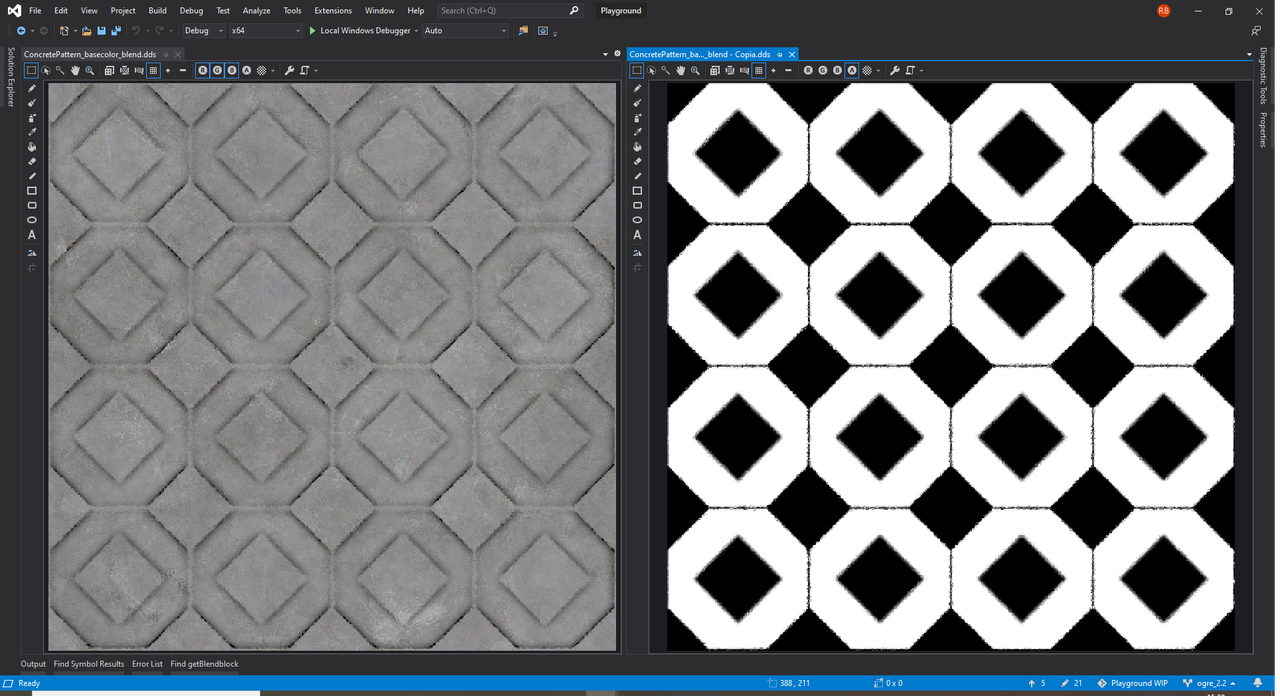
Has now become (black where alpha is equal to 0):

Once you moved from traditional alpha blending to premultiplied alpha, you also have to adapt the blend function. From this (
SBF_SOURCE_ALPHA /
SBF_ONE_MINUS_SOURCE_ALPHA):
Code: Select all
DestinationColor.rgb = (SourceColor.rgb * SourceColor.a) + (DestinationColor.rgb * (1 - SourceColor.a))
To this (
SBF_ONE /
SBF_ONE_MINUS_SOURCE_ALPHA):
Code: Select all
DestinationColor.rgb = (SourceColor.rgb * One) + (DestinationColor.rgb * (1 - SourceColor.a));
Since
TransparencyModes::Fade mode uses the first blend function (while
TransparencyModes::Transparent uses the second blend function), when I use it I have to override the blend block:
Code: Select all
const auto blendblock = datablockPbs->getBlendblock();

auto blendblockTemplate = *blendblock;
blendblockTemplate.mSourceBlendFactor = SBF_ONE;
blendblockTemplate.mDestBlendFactor = SBF_ONE_MINUS_SOURCE_ALPHA;

if (*blendblock != blendblockTemplate)
{
	datablockPbs->setBlendblock(blendblockTemplate);
}
But doing so trasforms my concrete tile in a piece of glass/plastic:
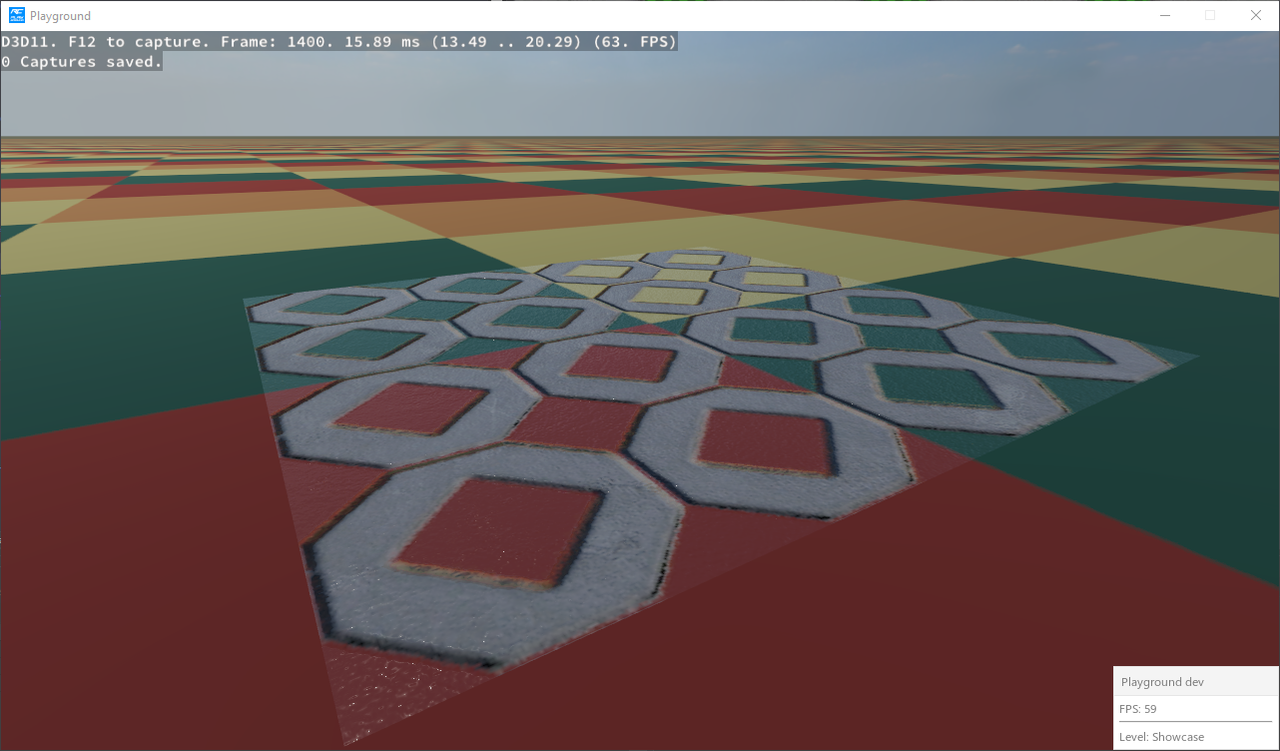
Am I doing something wrong? Could I be on error, but in a private chat with Matias I remember he told me to use
SBF_SOURCE_ALPHA /
SBF_ONE_MINUS_SOURCE_ALPHA blend function even for
TransparencyModes::Fade mode when textures with premultipled alpha are in play.
Re: Premultiplied alpha texture with fade transparency mode
Posted: Fri Jun 12, 2020 6:31 pm
by dark_sylinc
If the areas with 0 alpha still have lighting (like your case) then those regions still somehow have colour (one would have to research why is that, and that's probably the root of your problems)
Re: Premultiplied alpha texture with fade transparency mode
Posted: Fri Jun 12, 2020 7:01 pm
by TaaTT4
dark_sylinc wrote: Fri Jun 12, 2020 6:31 pm
If the areas with 0 alpha still have lighting (like your case) then those regions still somehow have colour (one would have to research why is that, and that's probably the root of your problems)
Hhmmm... roughness and metalness are both uniform colors set by code. Could be the normal map made like this?
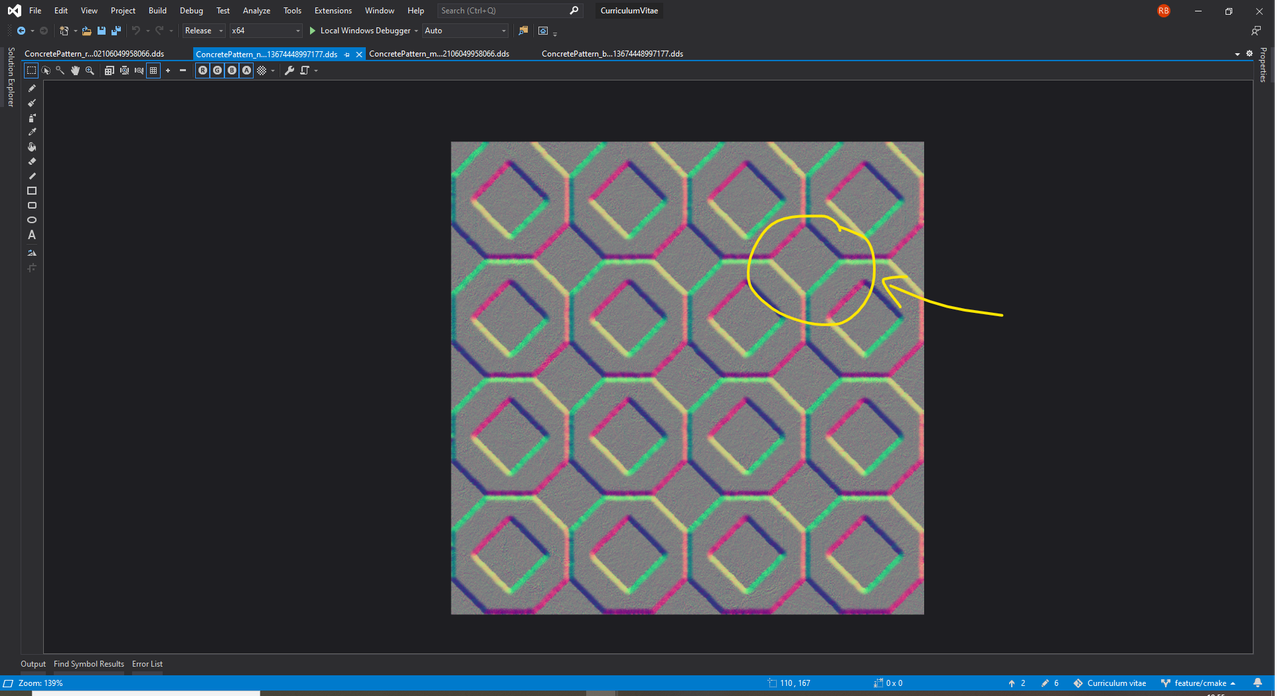
I guess I have to fatten it in the areas where RGB is black and alpha is 0.
Re: Premultiplied alpha texture with fade transparency mode
Posted: Fri Jun 12, 2020 7:06 pm
by dark_sylinc
What I mean is that the transparent regions the diffuse and specular colours should be 0; but if you see light; it means for some reason they aren't both pitch black.
Re: Premultiplied alpha texture with fade transparency mode
Posted: Fri Jun 12, 2020 7:13 pm
by TaaTT4
dark_sylinc wrote: Fri Jun 12, 2020 7:06 pm
What I mean is that the transparent regions the diffuse and specular colours should be 0; but if you see light; it means for some reason they aren't both pitch black.
It's strange because I call setMetalness(0.0f) (I'm using metal workflow). Anyway, I'll take a look with RenderDoc and I'll report further discoveries.
Re: Premultiplied alpha texture with fade transparency mode
Posted: Fri Jun 12, 2020 7:18 pm
by dark_sylinc
Mmmm I strongly suspect this means that a metalness of 0 leaves you with 0.03 of specular:
Code: Select all
pixelData.F0 = lerp( make_float_fresnel( 0.03f ), pixelData.diffuse.xyz * 3.14159f, metalness );
pixelData.diffuse.xyz = pixelData.diffuse.xyz - pixelData.diffuse.xyz * metalness;
Try a metalness of 1 instead.
Re: Premultiplied alpha texture with fade transparency mode
Posted: Fri Jun 12, 2020 7:32 pm
by TaaTT4
dark_sylinc wrote: Fri Jun 12, 2020 7:18 pm
Try a metalness of 1 instead.
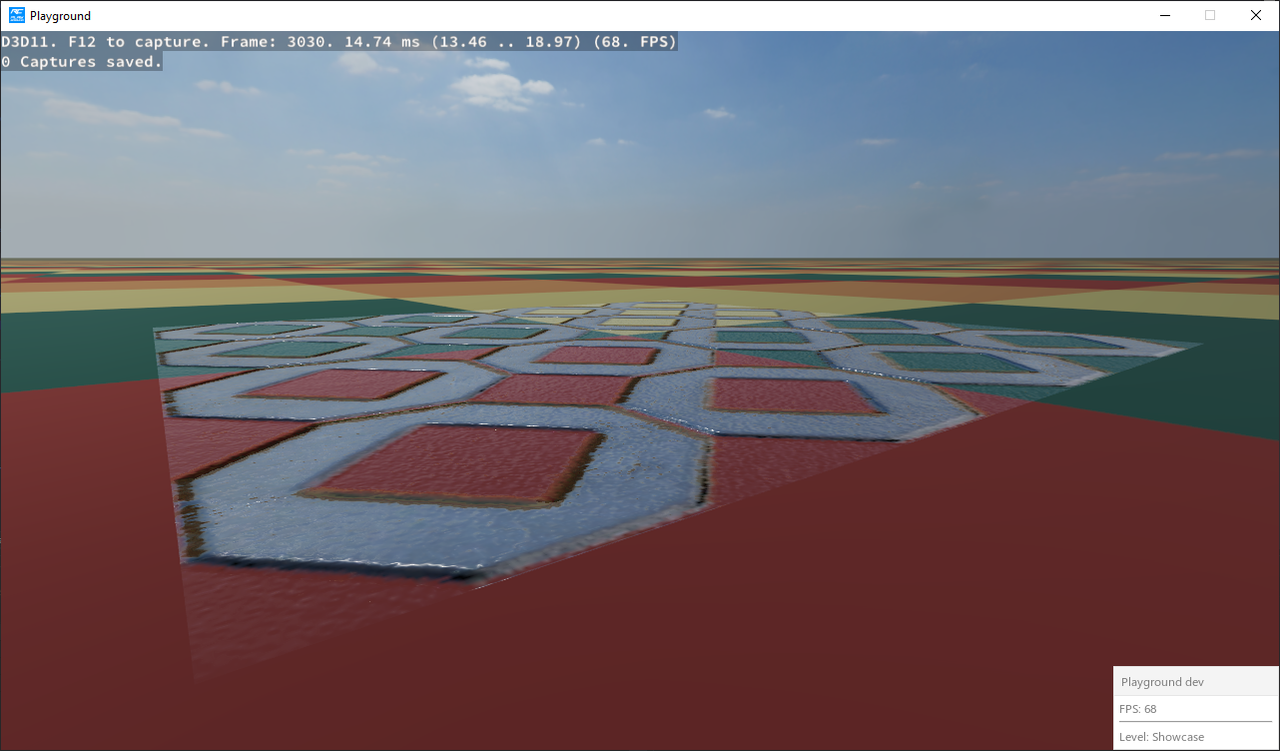
Done. Still see something in transparent areas:
Re: Premultiplied alpha texture with fade transparency mode
Posted: Tue Jun 16, 2020 11:18 am
by TaaTT4
dark_sylinc wrote: Fri Jun 12, 2020 7:06 pm
What I mean is that the transparent regions the diffuse and specular colours should be 0; but if you see light; it means for some reason they aren't both pitch black.
I've created a patch that reproduces the problem in
Sample_PbsMaterials:
Code: Select all
From ff129aba7f7a1661c80bd10de5644cbdfbeac2f6 Mon Sep 17 00:00:00 2001
From: TaaTT4 <raffaele.bratta@gmail.com>
Date: Tue, 16 Jun 2020 12:00:19 +0200
Subject: [PATCH] PREMULTIPLIED_ALPHA

---
 .../PbsMaterials/PbsMaterialsGameState.cpp    | 39 +++++++++++++++++++
 1 file changed, 39 insertions(+)

diff --git a/Samples/2.0/Showcase/PbsMaterials/PbsMaterialsGameState.cpp b/Samples/2.0/Showcase/PbsMaterials/PbsMaterialsGameState.cpp
index f07974a80..12673c542 100644
--- a/Samples/2.0/Showcase/PbsMaterials/PbsMaterialsGameState.cpp
+++ b/Samples/2.0/Showcase/PbsMaterials/PbsMaterialsGameState.cpp
@@ -219,6 +219,45 @@ namespace Demo

         mCameraController = new CameraController( mGraphicsSystem, false );

+        Ogre::v1::MeshPtr plane_v1 = Ogre::v1::MeshManager::getSingleton().createPlane(
+            "plane_v1", Ogre::ResourceGroupManager::DEFAULT_RESOURCE_GROUP_NAME,
+            Ogre::Plane( Ogre::Vector3::UNIT_Y, 0.0f ), 1.0f, 1.0f, 1, 1, true, 1, 1.0f, 1.0f,
+            Ogre::Vector3::UNIT_Z, Ogre::v1::HardwareBuffer::HBU_STATIC,
+            Ogre::v1::HardwareBuffer::HBU_STATIC );
+
+        Ogre::MeshPtr plane_v2 = Ogre::MeshManager::getSingleton().createByImportingV1(
+            "plane_v2", Ogre::ResourceGroupManager::DEFAULT_RESOURCE_GROUP_NAME, plane_v1.get(), true,
+            true, true );
+
+        Ogre::HlmsManager *hlmsManager = mGraphicsSystem->getRoot()->getHlmsManager();
+        Ogre::HlmsPbs *hlmsPbs = static_cast<Ogre::HlmsPbs *>( hlmsManager->getHlms( Ogre::HLMS_PBS ) );
+
+        Ogre::HlmsPbsDatablock *planeDatablock = static_cast<Ogre::HlmsPbsDatablock *>(
+            hlmsPbs->createDatablock( "plane", "plane", Ogre::HlmsMacroblock(), Ogre::HlmsBlendblock(),
+                                      Ogre::HlmsParamVec() ) );
+
+        planeDatablock->setWorkflow( Ogre::HlmsPbsDatablock::MetallicWorkflow );
+        planeDatablock->setTexture( Ogre::PBSM_DIFFUSE, "ConcretePattern_basecolor.dds" );
+        planeDatablock->setMetalness( 0.0f );
+        planeDatablock->setRoughness( 0.0f );
+        planeDatablock->setTexture( Ogre::PBSM_REFLECTION, "SaintPetersBasilica.dds" );
+        planeDatablock->setTransparency( 1.0f, Ogre::HlmsPbsDatablock::Fade );
+
+        Ogre::HlmsBlendblock blendblock = *planeDatablock->getBlendblock();
+        blendblock.mSourceBlendFactor = Ogre::SBF_ONE;
+        blendblock.mDestBlendFactor = Ogre::SBF_ONE_MINUS_SOURCE_ALPHA;
+
+        planeDatablock->setBlendblock( blendblock );
+
+        Ogre::Item *planeItem = sceneManager->createItem( plane_v2, Ogre::SCENE_STATIC );
+        planeItem->setDatablock( planeDatablock );
+
+        Ogre::SceneNode *node =
+            sceneManager->getRootSceneNode()->createChildSceneNode( Ogre::SCENE_STATIC );
+
+        node->setPosition( 0.0f, 0.001f, 5.0f );
+        node->attachObject( planeItem );
+
         TutorialGameState::createScene01();
     }
     //-----------------------------------------------------------------------------------
--
2.24.0.windows.2
The
ConcretePattern_basecolor.dds texture can be found
here.
No matter what metalness value I choose, If I use
Fade as a transparency mode and
SBF_ONE / SBF_ONE_MINUS_SOURCE_ALPHA as a blend function, I always see the plane badly rendered (not completely transparent where it should be).